
Label Applicator Troubleshooting: Jams & Web Breaks
A stopped label line needs a precise fault record. Separate a torn liner, a sensing error and a failed label transfer before proposing a change to the roll or machine.
THE SHORT ANSWER
Pick the unwind position that matches your applicator, then price the label. Start by recording the exact alarm, physical symptom and point in the web path where the problem appears. Compare the roll drawing, finished-label construction and approved machine setup. A new lot is useful evidence, but it does not prove that the labels (or the applicator) caused the fault.
Find your unwind position
Tell the applicator operator which edge should come off the roll first. Pick the copy position that matches your applicator, then put it on the quote.
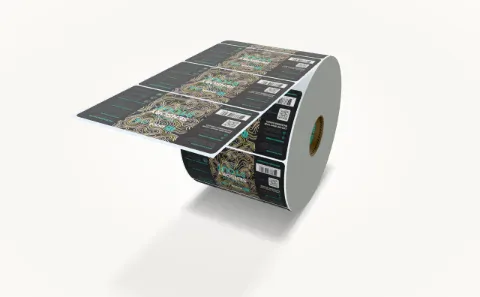 #1 Top edge first
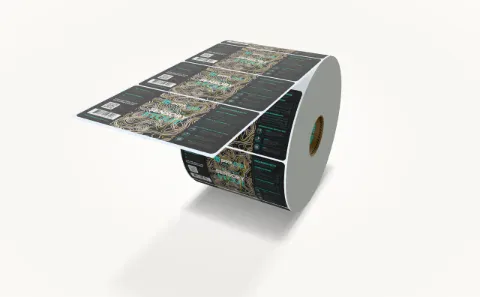 #2 Bottom edge first
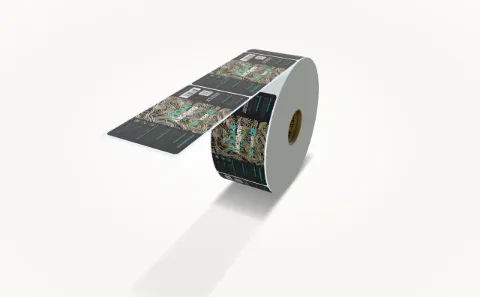 #3 Right edge first
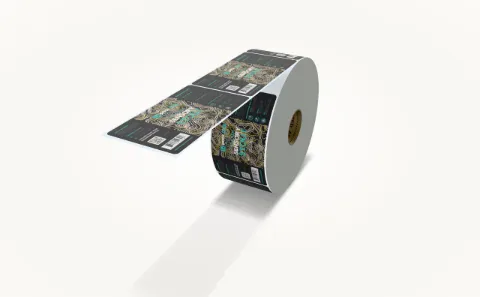 #4 Left edge firstFind your unwind position on a 3D roll Copies 1 to 4 wind out. See all eight on a real label →
Why start in PackOS
Once you know the details, see the price, the dieline and your label on a roll in one place.
From file to price in PackOS
What you get in PackOS
Skip the spec form
Upload a PDF or AI file and PackOS reads the size, shape, colors and finishes from your design. Nothing to retype.
Upload artwork →Instant price · sample label
| Run | Per label | Total |
|---|---|---|
| 10,000 | $0.1996 | $2,346 |
| 60,000 | $0.1692 | $10,500 |
| 110,000 | $0.1670 | $18,722 |
| 150,000 | $0.1663 | $25,290 |
| 200,000 | $0.1658 | $33,500 |
| 250,000 | $0.1655 | $41,725 |
Know the price before you ask
Every quantity is priced as soon as the file is read, with no waiting on a quote. Runs start at 10,000 labels per size with at least 2,500 per SKU. Your price depends on your artwork. Order online; the proof and a payment link follow by email.
Get instant label pricing →
Get a production dieline
No artwork yet? Draw the die with cut, bleed and safe-area lines so your designer starts from the right shape. We email it with your quote.
Create a label dieline →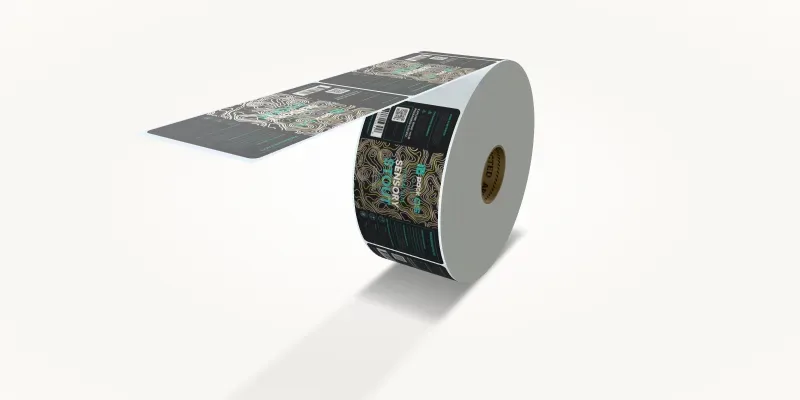
See it on the roll first
Turn your label on a 3D roll in the copy position you choose and check it before you order.
Upload artwork →Labels only. Foil, embossing and other specialty work are quoted by our team.
Name the fault before changing the setup
Write down the alarm text, machine model, installed sensor, job recipe, roll identity and operating stage. “Jamming” may describe several different events. Record what physically happened, not only the alarm label. The same message may have more than one explanation.
| Observed symptom | Useful evidence |
|---|---|
| Liner physically torn | Location and shape of the tear; roll position; retained web section; whether it coincides with a die-cut edge or splice. |
| Continuous feed, skipped labels or a sensing alarm | Actual sensor and operating mode; label/liner construction; approved teach procedure; whether the web is physically intact. |
| Label remains on the liner or transfers inconsistently | Where separation fails; finished construction; peel arrangement; line conditions and approved settings. |
| Label reaches the applicator but not the product | Transfer stage, product presentation, trigger sequence and equipment fault record. |
| Label is on the product but crooked or lifting | Placement and timing of the symptom; container geometry and surface; application and exposure history. |
For a label that lifts after application, use the adhesion investigation guide or the curved-container seam guide. An adhesion failure and a web-feed fault need different evidence.
Preserve the fault record and representative samples before clearing the problem. Inspection, cleaning, rethreading and adjustment belong to trained personnel following the equipment manual and the site’s safe-work procedure. Do not bypass guards or fault detection to complete a trial.
Compare the roll drawing with the installed equipment
Treat the label, liner, web path, sensing and product-transfer stages as a connected system. HERMA describes separate unwinding, braking, transport, dispensing and sensing components. That makes it useful to identify the stage where the observed failure begins rather than assume every stop has a roll-only cause. HERMA applicator components.
| Requirement | Record both sides of the comparison |
|---|---|
| Roll fit | Approved core inside diameter, maximum roll diameter and web width; actual roll measurements and machine limits. |
| Orientation | Approved roll diagram, printed face in/out and leading edge; actual presentation through the prescribed web path. |
| Repeat geometry | Label dimension in the feed direction, gap and pitch, with agreed tolerances; actual measurements and recipe definitions. |
| Construction | Face, adhesive and liner references, coating/print/finish and release requirements; the supplier-supported dispensing construction. |
| Sensing | Installed sensor model and mode; actual label/liner combination and any registration-mark requirement. |
| Web condition | Liner damage, splices, contamination, residual matrix or adhesive deposits; photographs and location references. |
Use the core and roll diameter guide, unwind diagram guide and die-cut and kiss-cut guide to prepare the drawing. A liner tear near a label edge is a reason to investigate converting quality and the web path; its location alone does not establish the cause.
Matrix stripping usually occurs during converting for conventional matrix-stripped pressure-sensitive rolls. Do not confuse a converting-stage matrix break with an applicator-stage liner break. Record any residual matrix actually observed on the supplied roll and compare it with the agreed format.
Have your artwork? See the price for every quantity in seconds.
Get instant label pricing →Measure gap and pitch, then plan the comparison
Gap is the distance between neighboring labels along the web. Pitch is the repeat distance between corresponding points on successive labels. For aligned rectangular labels, pitch equals label length in the feed direction plus the gap.
Irregular shapes or multiple lanes need a drawing that identifies the actual measurement and sensing path. For a hypothetical label measuring 50 mm in the feed direction with a 3 mm gap:
This example explains the terms; it does not recommend a 3 mm gap or authorize any machine setting.
The LabelMill LM1512 manual lists label length and gap length separately and distinguishes sensor configurations. It also documents model-specific fault behavior. Those examples support checking the installed equipment and revision; they are not a universal calibration procedure. LM1512 manual, pages 30 and 51–52.
Agree the next comparison with the responsible operator, converter or OEM. Where practical, hold the container, construction and approved setup constant while changing one planned factor. Preserve the before/after record. A successful short trial may justify further evaluation; it does not establish sustained production performance.
Start the roll drawing from an accurate label size and shape.
Create a label dieline →No file yet?
Open a sample label in PackOS
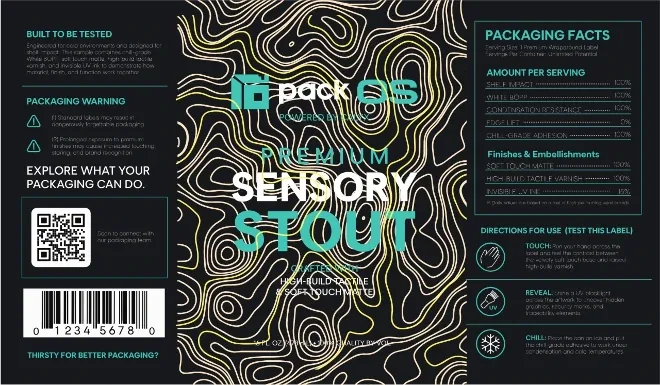
Load the Sensory Stout sample to see the price, the dieline and the label on a 3D roll before you upload your own.
Open the sample label →Fixing the roll spec? Upload your artwork and price the corrected label.
Get instant label pricing →Use a comparison log without assigning fault prematurely
Compare a retained reference roll and the suspect roll under documented conditions when the equipment team approves that test. Record differences that cannot be controlled. A new lot may differ, but wear, contamination, sensing, job setup or product presentation may also have changed.
| Comparison | What it can establish | What remains open |
|---|---|---|
| New lot versus retained reference on the same line | Whether the observed outcome differs in those recorded conditions. | Which material or process difference explains it; whether the reference is still representative. |
| Same roll on two approved setups | Whether the outcome changes between those setups. | The responsible mechanism; equipment, settings and transfer conditions may differ. |
| Measured roll versus purchase drawing | Whether a stated dimension or requirement matches the agreed document. | Whether that difference caused the fault or the specification adequately covered the application. |
For each run, log:
- The roll/lot, machine and recipe revision.
- Label count attempted and count accepted under defined criteria.
- Fault events and operating duration.
- The inspection method.
- Startup waste, kept separate from the main run.
Do not report a percentage without its denominator or compare event counts from unequal run lengths as though they were equivalent.
Send a complete evidence packet to the right team
Prepare a concise packet containing:
- The ordered drawing and revision.
- Label construction and lot, plus actual measurements.
- Machine and sensor identity and the approved setup.
- The exact alarm text and location photographs.
- Retained samples and the comparison log.
Labeling food or beverage products? Start with the food and beverage label page.
Food and beverage labels →Keep observed facts, proposed causes and proposed changes in separate fields.
Ask the converter to investigate measured roll differences and finished-label dispensing requirements. Ask the OEM or integrator to review equipment faults, sensor compatibility, threading and the approved operating procedure. Involve both when the boundary between the roll and machine is unresolved. The packet should make that boundary visible rather than declare responsibility from one symptom.
Agree the trial quantity, representative operating conditions, acceptance criteria and approval owner before changing the production specification. Record whether the result is a diagnostic observation, an accepted corrective action or a qualified production revision. Use your quality process to determine the disposition of affected product.
Instant label pricing
Upload your artwork and see the price
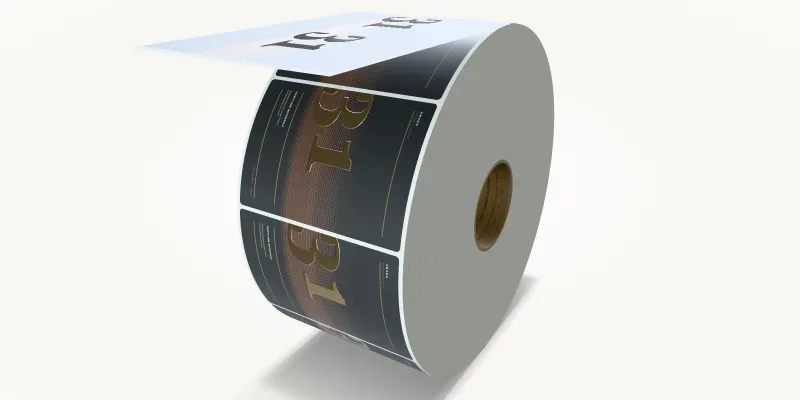
Drop in a PDF or AI file. PackOS reads the size, shape and colors and prices it from 10,000 labels per size.
Upload artwork →Want a person to check the roll spec before you order? Talk to our team.
Book an enterprise demo →Carry the approved requirements into the next label order
Keep the accepted roll drawing and construction revision with each SKU or approved family of SKUs. Confirm changeover, splice and roll-identification requirements with the converter and applicator team. Revisit approval when the liner, finish, label geometry, sensor, equipment or operating conditions change.
For custom roll labels, upload artwork and review the available specification and quote assumptions. Artwork alone does not contain machine limits or prove that a proposed construction will dispense. Supply the roll drawing and unresolved line requirements separately, and confirm them before production.
Frequently asked questions
Why is my label applicator jamming?
First distinguish a torn liner, a sensing or feed error, a failed transfer and a placement problem. Record the exact alarm and physical symptom, then compare the roll, construction and approved machine setup. The symptom alone cannot rank causes.
What is the difference between label gap and pitch?
Gap is the space between neighboring labels along the web. Pitch is the distance between corresponding points on successive labels. For aligned rectangular labels, pitch equals the label length in the feed direction plus the gap.
Is a 3 mm label gap correct for every applicator?
No. Confirm the required gap and tolerance for the actual machine, sensor, label construction and layout. A 3 mm gap in the worked example is hypothetical, not a universal setting.
Does a broken-web alarm always mean the liner tore?
Check the physical condition and the fault definition in the manual for the installed equipment. Some model-specific fault descriptions include sensing or feed conditions as well as physical web breakage. Preserve the exact alarm and inspection record.
Do clear labels always require an ultrasonic sensor?
Do not choose a sensor from appearance alone. Confirm the installed sensor model and mode support the actual label and liner construction, and use the OEM-approved setup procedure and representative samples.
Does a problem on one new roll prove the supplier is at fault?
No. Compare the ordered specification, measured roll, approved setup and recorded outcomes. A dimensional nonconformance and the cause of a line fault are separate findings that need supporting evidence.
What should I send the supplier about a label feed problem?
Send the roll drawing, construction and lot references, machine and sensor identity, recipe revision, exact alarm, photographs, retained samples and a comparison log with attempted and accepted counts. Identify uncontrolled differences and the proposed next trial.